The fastest and safest free Roblox script executor for Windows, macOS, Android, and iOS. Zero ads, no key systems, no bloat — just clean external execution with 100% UNC compliance and 3,000+ ready-to-run scripts.
Available for Windows, macOS, Android, and iOS.
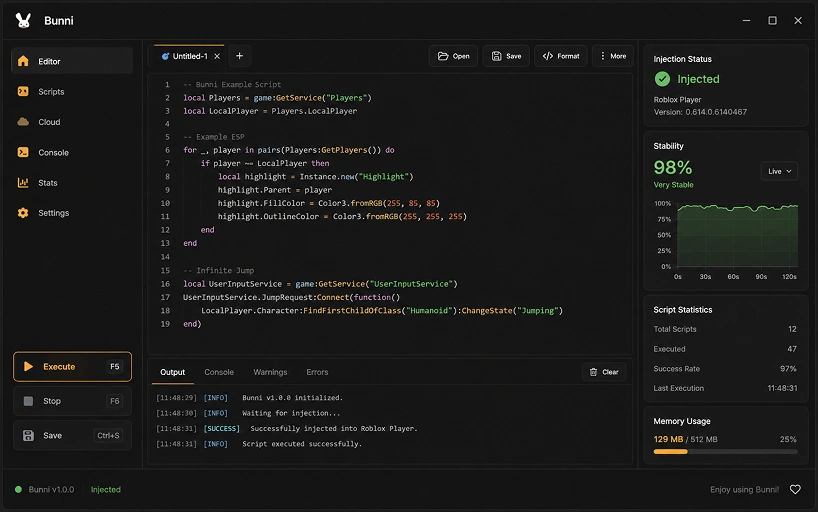
System Ready
Scripts Loaded
Bunni Executor redefines how you interact with Roblox scripts. We prioritized a clean, native-feeling architecture that doesn't slow down your device while maximizing execution power.
Whether on iOS or Android, execute scripts flawlessly. The UI scales perfectly to your device for on-the-go modification without layout breaking.
Keep your instance safe. Our external engine attaches silently without UI clutter.
Run complex functions, require statements, and visual hubs instantly.
Incredibly lightweight, launching and attaching in milliseconds.
Designed an elegant, premium editor built specifically for developers.
When the game updates, we update. Our dedicated development team ensures the product stays online and undetected consistently week after week.
Security and transparency are our highest priorities. Bunni executor is safe — built from the ground up to ensure no malicious code, unwanted bloatware, or aggressive ads touch your device. By investigating the github bunni executor presence, the community can verify our API integrity.
@bunni-executor / core
Choose your operating system below to see the exact steps for downloading, installing, and executing scripts on your device.
Track every Bunni Executor release, security patch, and feature drop. We ship weekly — dig into the details of what's new, what changed, and what got squashed.
Bunni Exploit runs every major Roblox hub — Blox Fruits, Grow a Garden, Blade Ball and 3,000+ community scripts.
Running scripts in Bunni Executor takes under a minute. Follow these five steps to attach, load, and execute any Roblox script safely.
Open the Bunni Executor app on your device. Make sure it's running before opening Roblox.
Launch Roblox and join any game you want to run a script in — Blox Fruits, Blade Ball, anything.
Click the attach button in Bunni. Injection completes silently in under 400ms with no popups.
Browse the built-in hub with 3,000+ scripts, or paste your own Lua code into the editor.
Press Execute. The script runs instantly in-game — no reload, no relaunch, no waiting.
Common Bunni Executor issues solved in under a minute. Browse by category or scroll through the top fixes reported by our community.
This is a standard false positive. All script executors get flagged because Defender heuristics trigger on process-injection patterns. The Bunni Executor binary is signed and audited — there's no actual threat.
Open Windows Security → Virus & threat protection.
Click Manage settings under "Virus & threat protection settings".
Scroll to Exclusions → Add a folder → select the Bunni install directory.
This is almost always a real-time antivirus scan blocking file writes during the final signature verification step. It's not actually frozen — just waiting on a locked file.
Kill the installer via Task Manager.
Temporarily disable real-time protection for 5 minutes.
Re-run the installer as Administrator. Re-enable protection after install completes.
Bunni Executor needs Roblox running and joined into a game — not just at the game list.
Fully close Roblox from the system tray.
Launch Roblox and join a game — wait until you're loaded in.
Return to Bunni and hit Attach again.
When Roblox pushes a client update, memory offsets shift and injection breaks temporarily. We patch this within 2–8 hours on average.
Check the System Status widget for update deployment.
Open Bunni Executor and click Check for updates in settings.
If no patch is out yet, wait — never install "quick fix" builds from unofficial sources.
Usually another script executor or overlay tool is holding the process handle. Only one injection engine can attach at a time.
Close any other executor apps completely.
Disable Discord overlay, MSI Afterburner, and RivaTuner if running.
Restart Roblox and try again from a clean state.
The script is using a legacy function name that's been deprecated. Bunni Executor follows the UNC (Unified Naming Convention) standard.
Update the script to use the standard function names, or contact the script author for a UNC-compliant version.
The script's origin URL (usually a Pastebin or Rawscripts link) went offline. This is on the script host's side, not ours.
Try the "Alternative source" button in the hub next to the broken script.
Report the dead link with the flag icon — we'll archive a mirror within hours.
If you've been running scripts for several hours, the script cache can grow. Clearing it takes 5 seconds.
Open Bunni → Settings → Advanced.
Click Clear script cache. RAM usage drops immediately.
The IntelliSense engine indexes 5,000+ line files on the main thread by default. Turn on the async indexer for smoother typing.
Settings → Editor → Async indexing → On.
Optional: reduce minimap detail if on a low-end GPU.
The developer certificate isn't trusted yet. iOS blocks any sideloaded app until you approve the signing profile manually.
Open Settings → General → VPN & Device Management.
Tap the developer profile listed under "Enterprise App".
Tap Trust and confirm. Bunni Executor will launch normally after.
Android 12+ requires explicit permission for apps drawing over other apps.
Settings → Apps → Bunni → Display over other apps.
Toggle it on. Relaunch Roblox — the overlay will appear.
Gatekeeper quarantines the download. This one-line Terminal command removes the flag.
No issues in this category yet
Bunni Executor runs smoothly here — nice.
Everything about Bunni Executor — safety, downloads, mobile support, pricing and Roblox script execution answered in one place.
Yes. Bunni Executor is 100% safe — built with zero malware, spyware, keyloggers, or cryptominers. Every release passes an automated security audit before shipping. Our core UI framework and API wrappers are transparently published on GitHub, so anyone can verify the code themselves. We also don't inject ads or bundle third-party trackers.
Download directly from the official domain — bunni.llc — by clicking any Download button on this page. Pick your OS (Windows, macOS, Android, iOS) and follow the setup wizard. Never trust mirror sites or "quick installers" from YouTube, Discord, or forums — those are typically re-uploaded with malware attached.
Yes — dedicated native apps for both iOS (via sideloading with AltStore, Sideloadly, or Scarlet) and Android (modified APK). The mobile engine is optimized for low battery drain and prevents the crashes typical of desktop-ported executors. A gesture-aware floating overlay lets you run scripts without leaving the game.
Yes. The free tier includes the full execution engine, all UNC-compliant API functions, and access to the 3,000+ script hub — no crippled features. There are no link shorteners, no key systems, and no forced ads to unlock the basics. An optional premium tier exists purely for power users who want cloud sync and priority support.
Five simple steps: (1) launch the Bunni app, (2) open Roblox and join a game, (3) click the attach button — injection completes in under 400ms, (4) pick a script from the built-in hub or paste your own Lua code, (5) hit Execute and it runs instantly in-game. No reload or relaunch needed.
You're on it. The only official Bunni Executor domain is bunni.llc. Any site with a similar name (bunni.com, bunni-exec.net, bunniexecutor.io, and so on) is a copycat — usually bundling malware into a repackaged installer. Bookmark bunni.llc and download only from here.
Partially. The UI framework, API wrappers, and utility libraries are all public on our GitHub — you can inspect exactly how the app looks, behaves, and talks to scripts. The injection engine itself stays closed-source to protect our anti-detection techniques from being reverse-engineered by anti-cheat vendors.
All major hubs run out of the box: Blox Fruits, Grow a Garden 2, Blade Ball, Pet Simulator 99, Arsenal, Doors, Anime Vanguards — plus 3,000+ community scripts in the built-in hub. Bunni is 100% UNC compliant, so anything that works on other executors works here too.
Yes. When Roblox pushes a client update, our dedicated team ships a matching patch — usually within 2–8 hours. Auto-updates run silently in the background, so you won't have to redownload anything manually. Weekly maintenance keeps injection undetected and stable across every supported game.
Any script executor carries some risk — that's the nature of modifying a live game. Bunni Executor uses randomized memory patterns and dynamic module hiding to stay ahead of anti-cheat heuristics, and we've maintained a near-zero detection rate for months. Still, avoid using scripts on your main Roblox account, don't be flashy in public servers, and never share screenshots that show the overlay.